RayFire Home
PHYSICS TAB
Table of Contents
1.3 Unyielding Objects
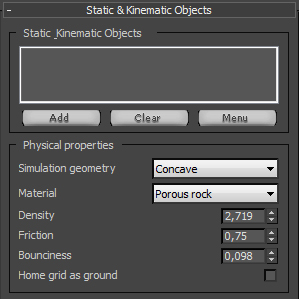
In this rollout you can define physical properties for Unyielding objects.
RayExplosion Reactor

Unyielding Objects list
Add objects to this list in that you want to use as deflectors (ground, walls) for Impact and Inactive objects. Pay attention that you can use animated unyielding objects as well. In this case they will push all other objects on their way and nothing will not be able to affect on them. Using PhysX engine you can use even Deformable objects, like pointcached character. The only way to define Unyielding object as Deformable is to select this object, Open Custom properties Rollout, check On use Custom properties and check on Deformable Unyielding.


Unyielding Properties
Simulation Geometry : Geometry for physical interaction during the simulation.

Very Important Note: PhysX engine unable to simulate concave Unyielding objects only in case Unyielding objects is static, which means that object should not be animated. Otherwise PhysX will automatically use convex simulation geometry for Unyielding object. If you need to simulate concave Unyielding geometry you may define it as Deformable, in this case simulation will take more time, but this is the only way.


Material : Material presets, use these to quickly assign Friction and Elasticity on next two spinners.
Friction and Elasticity : RayFire will assign these values to Unyielding objects.

Affect on Inactive : PhysX plugin engine in current state by default unable to affect on Inactive objects by Unyielding objects, but activating some experimantal and not fiished functions this might be possible. Turn on this check box if you really need to affect on Inactive objects by Unyielding during simulation. Pay attention that you will get a lot of errors in max Script Listener window but is is ok, they don't affect on simulation anyhow.


Table of Contents